 Click for Code
How we prevented $60K MRR clients from being churned
Published on January 1, 2026
Project Overview
The project involved a social media intelligence web app where the customers can design and create social media posts, publish them across multiple accounts and regions, and schedule them for specific times.
A bug report flagged a memory issue affecting 3-4 high-MRR clients: their browsers crashed within 1-2 minutes of use. Support mentioned a spike to 2.2GB RAM for a single browser tab and suggested the calendar view was unable to deal with large data. The affected clients could not use the app, creating a combined churn risk of $60K MRR.

Process
The project is a Vue application that uses web components which are made using Stencil.js in an internal components library.
I investigated the issue to isolate the root cause using Chrome DevTools to compare two states of the app: on initial load and after one minute of general exploration.
In the Memory tab, the heap snapshots (a dump of memory at a point in time) revealed many detached elements (elements removed from the DOM but retained in memory) with no parents present. I also saw many spreadsheet instances. The Shadow DOM was retaining these detached nodes, inflating the memory usage.
In the Performance tab, I saw long tasks (red blocks) on the main thread. These tasks blocked rendering and input handling, which explained the UI freezes. They appeared as soon as the app rendered and persisted for most of the session. I disabled the Calendar to test the suggestion by support team; performance was still degraded even without the Calendar enabled (Even though the calender is the core of the whole application). There were also non-visible modals being mounted on the initial load. Even when not shown, they triggered expensive API calls, state updates, and heavy computations.

Heap snapshots exposed detached DOM nodes retained in memory.
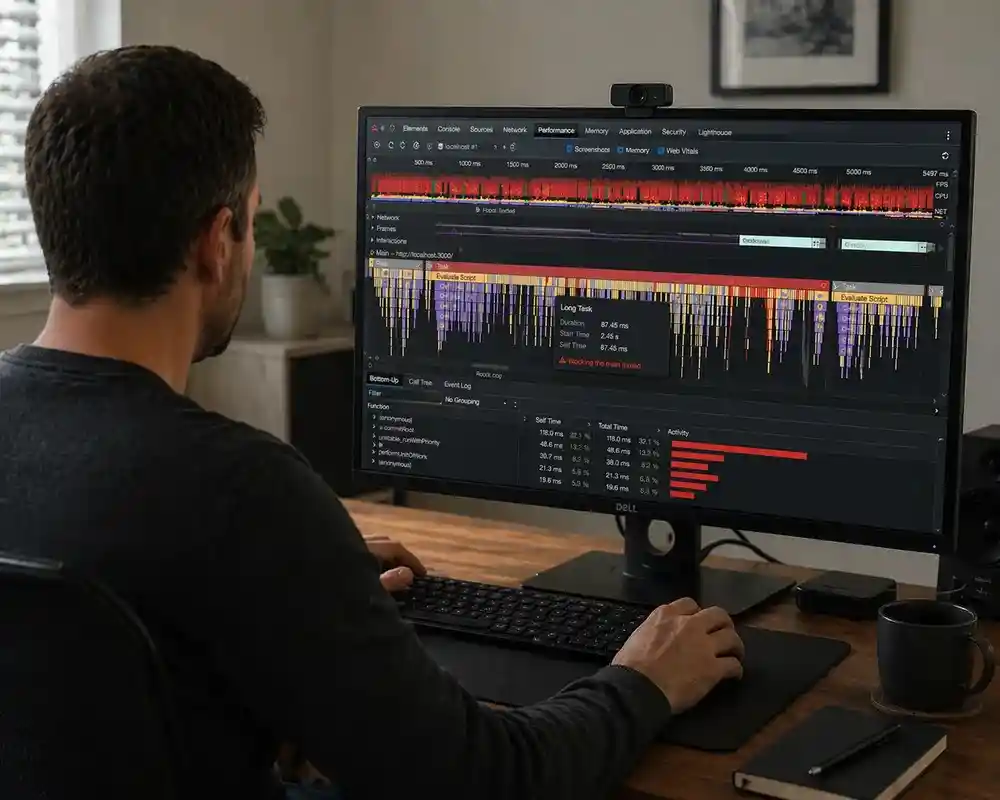
Performance traces showed long tasks blocking the main thread.
I reproduced the issue in other accounts with large calendars and could not trigger the crash, this ruled out the hypothesis that calendar can not handle heavy data. I narrowed the scope to only the affected clients and identified a different trigger: they had an unusually large number of tags (internal keywords used in posts). Opening the tags list (1000+ items) caused the application to slow down significantly.
After finding the tags issue, I hit a blocker since I could not test fixes on the client account without pushing code to prod. I also could not make repeated deploys to production. The Project had 3 environments set up: Staging, Feature Branch Environments based on Staging, and Production.
Outcome
There were 2 kinds of fixes that were finalized after investigation: General and Environment specific.
The Lazy load + Cleanup for modals and other detached elements was a general fix that was implemented for all environments.
The tags list issue was specific to the production environment, so I set up a dedicated production-like environment for feature testing. This let us validate changes against production data without affecting it. In that environment, I enabled list virtualization for the tags list (rendering only visible items instead of the entire dataset).
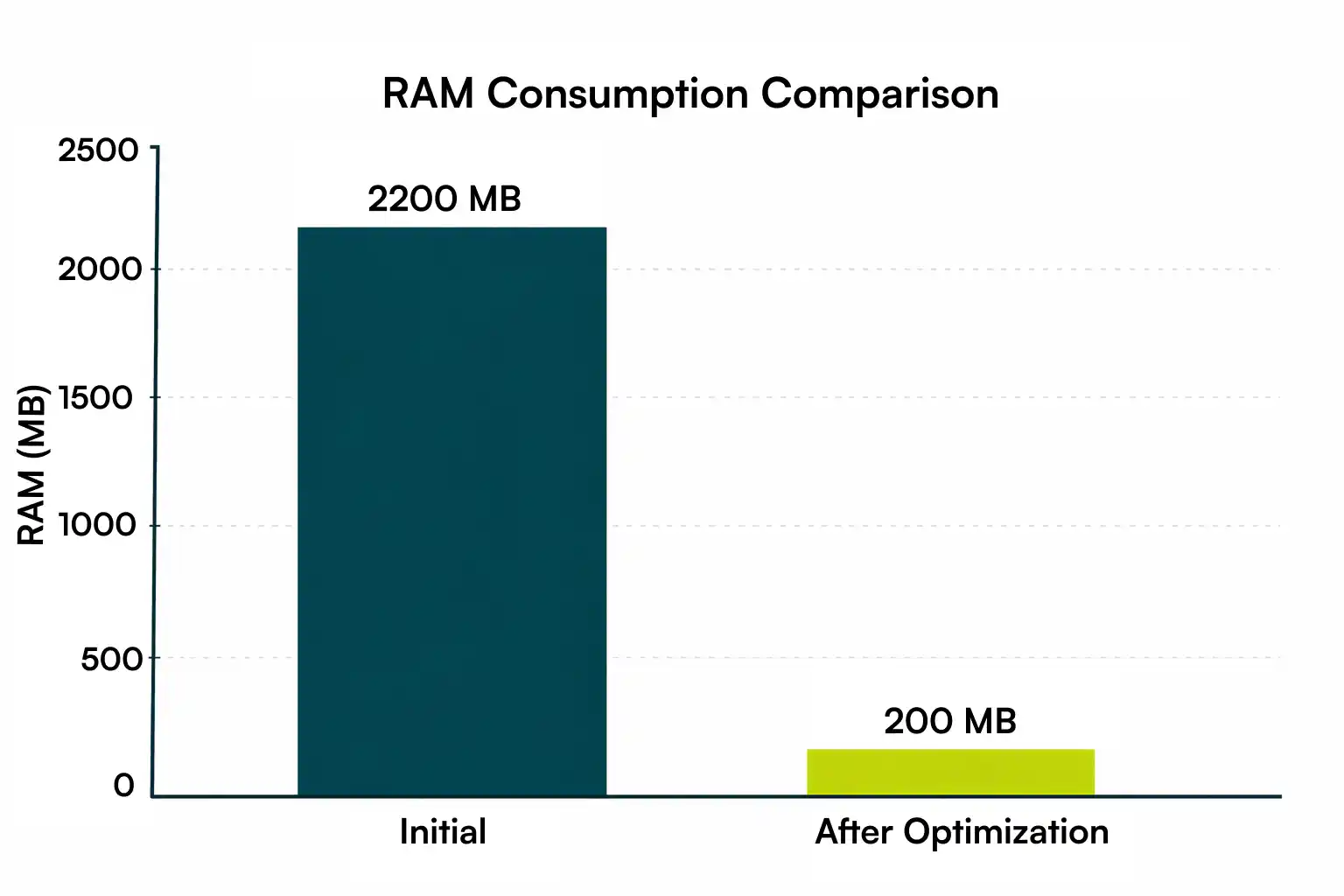
With these fixes, I reduced memory consumption from 2.2GB to ~200MB, and this did not increase even after continued usage of the application.
Tech Used
Vue.js is used in conjunction with Web Components compiled via Stencil.js.
Got a clear picture so far?
If you're wondering whether we are a good fit for your project, a quick 15-minute call can help clarify the next steps. Book a Quick Call NowWrite To Us At Your Own Convenience
What People Say
Shaped by years of experience, our stack includes React, Next.js, TypeScript, Node.js, Python, robust databases, and top-tier cloud services - chosen for stability, scalability, and clean engineering practices.

“It’s been such a pleasure working with Parmeet. We’ve been impressed by the quality of his code, his communicativeness, his work ethic, and his passion for making the product intuitive and delightful. We’d recommend him enthusiastically to others and hope to work together again in the future.”

“I worked with Parmeet for half a year, and I can highly recommend him as an experienced front-end developer and a responsible team member. He can quickly understand an issue or a new codebase and provide a solution.”

“I got the chance to briefly work with Parmeet and I must say that I enjoyed every single second of that. He is one of the few people (I’ve worked with) who have a zeal to learn more, can quickly adapt to new technology, is a fast learner, highly productive and more important is honest and humble.
He has got a very pleasing personality and is very presentable.
Parmeet is self disciplined, can manage and plan his time very efficiently and can deliver tasks on time.
I would like to recommend him as a Full Stack Developer (JavaScript) who can deliver polished front end applications on ReactJs that are backed by equally capable backend developed in NodeJs (deployed on AWS Cloud)
People like him are an asset to any team.”

“He is a hard working individual with good insight into what makes UX work for the end user. A joy to work with.”

“We brought Parmeet onto our team to accelerate development of a new product, and he definitely delivered. Parmeet immediately took ownership over all the stories we assigned to him, thinking carefully about the user experience and ensuring that the components he built would function well on both desktop and mobile. He was also an excellent collaborator, eager to share ideas for how we could improve the product and receptive to feedback on his work. Thanks to Parmeet, our MVP release was smooth and on schedule. We will definitely keep him in mind for future projects!”

“I had the pleasure of working with Parmeet on the same team at Meltwater, and I can confidently say that he is one of the best engineers I’ve worked with. Parmeet brings an exceptional level of attention to detail, a deep understanding of software engineering, and a curiosity that inspires overall team improvements.
He approaches every sprint with a holistic mindset, considering not just the immediate implementation but also the broader product impact. Parmeet consistently contributes thoughtful design suggestions and explores alternative approaches, clearly outlining trade-offs and helping the team make informed decisions.
He’s not one to shy away from challenges and frequently demonstrates leadership through initiative, insight, and collaboration. His ability to balance technical depth with product thinking makes him an invaluable asset to any engineering team.”

“Parmeet is an all-star frontend developer and a great teammate. I’ve worked with him on multiple features, and he consistently delivers thoughtful ideas, timely solutions, and pixel-perfect, scalable UI. I’d gladly work with him again!”

“I worked with Parmeet at Jiffy, and he is a dependable frontend developer who delivers high-quality work. He writes clean and easy-to-maintain code and always focuses on good user experience and performance. Parmeet is skilled in JavaScript, TypeScript, React, and modern CSS (SCSS, Tailwind). He works well with the team, takes ownership of his tasks, and can be trusted to deliver. He would be a strong addition to any frontend team.”

“I really enjoyed working with Parmeet. Highly recommended for React-based web development projects with the rich user interfaces.
He is eager to learn and improve in all areas. He has excellent communication and technical skills. He is hard-working, ensures deadlines are duly met, and never compromises with product quality.”

“It was our pleasure to work with Parmeet. He worked on creating the online identity of our business. He got not just the development of the website done but got the copywriting and product photography work done as well. The website created by him is fast and responsive. It has helped us land many new international clients and increase our sales by a whopping 25%. I would strongly recommend hiring him.”

“It was a pleasure to work with Parmeet, an honest and reliable Dev!”

“Parmeet was my junior at classic informatics and we have worked closely on numerous task alongside. His attention to detail and eagerness to learn sets him apart from anyone that I have worked with.
Parmeet’s ability to handle any challenge thrown at him with utmost level of calmness and sincerity makes him an asset for organisation. When it comes to front end I have never seen someone so excited about the things they are developing, Parmeet is keen to make a noticeable impact on anything he picks up.
He was an remarkable colleague and I still miss working with him. As a lead, Parmeet earns my highest recommendation.”

“Parmeet is an excellent developer and a great friend, he is really good in React and has been a real gem to our last company. His technical skills are impressive as per his experience. He always makes sure to meet all the deadlines within a given time frame & with the top standards. He is hardworking & dedicated in his work. It is a pleasure and honor to recommend Parmeet to anyone who wants to hire him.”

“I am pleased to write a letter of recommendation for Parmeet Singh. I highly recommend Parmeet Singh to your organization.
I have known Parmeet Singh for the past 3 years as he was working with me in the same project at Classic informatics. During our time together, his collaboration and leadership skills were truely impressive, and his UI & design work on a project won glowing reviews from peers and client both.
Parmeet Singh is well equipped to grow from challenges that he is presented with. His strong computer programming skills prepare him beautifully for your company. I strongly endorse making Parmeet Singh a member of your team.”

“There is no better colleague than Parmeet. He is one of the most dedicated professionals I’ve worked with and is willing to put that extra help whenever you need it. His expertise as a developer is considerable, and it helped our team come up with more efficient solutions on different projects. He is a great asset to our company.”

“Parmeet is a good and technical sound is his work. I worked with him on 2 projects and he developed the project proficiently on frontend and backend. I hope to get work opportunities with him in future so we can connect the world together for the betterment.”

“I worked with Parmeet in Credit Culture. He possesses great abilities in UI/UX. He always brings new ideas to the table and shows great dedication to work. He’ll be a good addition to any team.”

“I’ve worked with Parmeet for short period of time. He is very skillful frontend developer. He don’t limit himself to one thing always love to explore new things and share with others.”

“He is a good coder and has a humble attitude. His work quality is really good. I got a chance to work with him and we both learnt a lot.”

“Parmeet is a creative developer with fantastic eye for unique and innovative designs in addition to his great problem solving skills and zeal to be acquainted with new inclusions to JS.
He is an excellent team player who can outshine independently as well.”
Let's Bring Your Next
Big Idea to Life
Whether you're brainstorming ideas, looking to bolster capabilities, rapidly expanding your team, or delegating
projects, count on us to meet your needs effectively any or every step of the way
OR
Write To Us At Your Own Convenience